CASE STUDY — 01
Plug-in Inventory Management
Designing for a domain I didn't start out knowing.
- Role
- Lead / sole UX designer
- Duration
- —
- Constituencies
- DEG · BFS · NPMG (audit) · FSL
- Stack
- Angular · Angular Material/CDK · SCSS design tokens
Summary
Context. PIM is AT&T's system of record for the physical hardware — line cards, optical transceivers, interface cards, chassis plug-ins — that makes up the national wireline network. The product owner has quoted a managed inventory value of $56 billion. I was lead / sole UX designer on the application.
Problem. PIM 1.0 was functional but had grown organically: no consistent UI patterns, no shared visual language, fragmented flows across features built by different teams over time. It worked on desktop but didn't scale, and it was replacing a set of legacy SharePoint tools the business had outgrown.
Contribution. I moved PIM from a collection of functional screens toward a coherent, systematic product — while learning a genuinely unfamiliar domain (telecom hardware, audit compliance, supply chain operations), designing for four distinct user groups with different and sometimes conflicting needs, and working inside real two-week sprint constraints.
Impact. A validated UI redesign (A/B tested against the legacy interface), a consistent design foundation the team could build new features on without re-solving the same problems, and a product that fully replaced the SharePoint-based tools it succeeded.
The scale and the stakes
PIM doesn't manage software add-ons — "plug-ins" here means physical modular hardware: line cards and transceivers in routers and switches, optical modules in DWDM systems, interface cards, shelves, power units. PIM tracks, configures, and governs the lifecycle of these assets across AT&T's wireline network — acquisition, assignment to network elements, decommissioning, reuse, audit, and financial depreciation.
It sits inside a larger stack that runs from network planning through fulfillment, operations, and finance — which meant every "add a modal for assigning a plug-in" ticket was really touching several enterprise systems at once: procurement, network topology data, SAP/financial systems, and audit trails governed by rules closer to Sarbanes-Oxley compliance than to consumer UX.
- 01
Acquired
Planning - 02
Assigned
In service - 03
Validated
Audited - 04
Decommissioned
Archived
A simplified version of the lifecycle state a single plug-in moves through — the same shape of problem as tracing one optical transceiver from acquisition to retirement, which is how I learned the domain in the first place.
The business case for the platform was strong enough that its success became the reason AT&T funded a wider rebuild: PIM, Capital Tools, and Minor Materials are being consolidated (with a fourth application, TEO, for order management) into a single Procurement and Inventory Management suite that reuses the UX patterns, components, and design tokens built for Plug-ins — more on that in the Design Library case study.
Not a domain expert — and designing anyway
I came into this project with no telecom or supply-chain background. What I had was a repeatable way of getting from "I don't understand this" to "I can design for this responsibly":
- Tracing objects through their lifecycle. Following a single plug-in — say, an optical transceiver — from acquisition through installation to retirement, rather than trying to absorb the whole domain abstractly.
- Learning the vocabulary that mattered. Distinguishing wireline (the network-level hardware PIM manages today — cards, ports, topology) from hardwire (the physical cabling and cross-connects that are the platform's likely next scope) because the distinction shapes what the UI needs to represent now versus later.
- Treating stakeholders as domain teachers, not just approvers. The weekly User Story Group review (below) doubled as the fastest way to learn how DEG, BFS, NPMG audit, and FSL actually used the system day to day.
- Building a running knowledge base as I went. Rather than losing context between sprints, I kept a working written record — domain notes, terminology, decisions and their rationale — that became something close to an institutional wiki for the project. More on this on the About page.
The result wasn't textbook discovery research. It was closer to how an embedded engineer picks up a new codebase: incrementally, through contact with the real thing, corrected in real time by the people who actually work in it.
Designing rules, not just screens
Two constraints shaped almost every workflow on PIM, and neither is the kind of thing a typical UX case study talks about:
Preventing users from gaming the system. Many workflows exist specifically to enforce correct sequencing and accountability — so a user can't skip a required validation step or reclassify an asset to dodge an audit flag. UX had to make the compliant path the obvious path: progressive disclosure, constrained inputs, and confirmation flows that reinforce the correct business logic rather than just describing it in a help tooltip.
Making "this could take down a service" visually different from "this is safe." Some actions in PIM affect live customer-facing services; others are internal or planning-only. That distinction had to be legible in the interface itself — through warning states, confirmation gating, and information hierarchy — not left implicit in the user's own judgment.
Designing for rules like these is a different job than designing for delight. The measure of success is whether a user can't make an expensive mistake, not whether the screen looks good doing it.
Designing for four audiences at once
I present new and updated designs weekly to a User Story Group with representatives from four distinct constituencies: DEG, BFS, NPMG (audit), and FSL.
These groups don't want the same things. An audit-focused reviewer cares about traceability and evidence; a field-services reviewer cares about speed and minimal steps; a business-facing reviewer cares about whether a workflow matches how their team is actually structured. My job in that room wasn't to defend a design — it was to negotiate between real, sometimes conflicting operational needs and land on something that shipped without breaking any of them. That's not "UX research" in the traditional sense, but it functioned as continuous, high-frequency validation with actual users of the system — arguably more useful than a research phase run once at the start of a two-year program.
PIM 1.0 → PIM 2.0: the legacy question
When I joined, PIM was desktop-functional but visually inconsistent — the UX flows had grown organically, without a shared system for spacing, hierarchy, or interaction patterns. It wasn't broken; it just required real cognitive effort to navigate, and it wasn't a foundation anyone could build on quickly.
My contribution was turning it into a coherent product: consistent layout structure and visual hierarchy across modules, a shared token-based styling foundation instead of one-off styling per feature, standardized action placement and table behavior, and clearer state communication (assigned, pending validation, decommissioned, and so on).
FIG_01 — PIM 1.0 vs 2.0
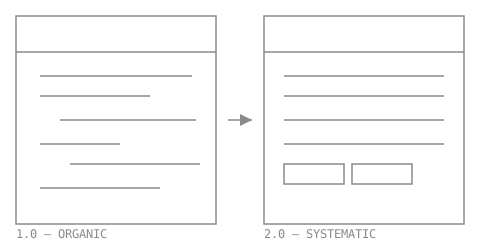
We ran an A/B test comparing the legacy interface against the redesigned version. The updated experience improved task completion speed and reduced friction in the flows we tested, and — more importantly for a platform this size — it gave the team a foundation it could extend without re-solving the same layout and interaction problems on every new feature.
How outcomes were actually validated
Testing was staged in three tiers, driven primarily by the product owner:
- A small expert group testing in a development environment — the cheapest place to catch serious misunderstandings before they reached real users.
- A wider group testing in production — more realistic data, permissions, and working conditions.
- Full release to representative users, backed by a dedicated Teams feedback channel that kept a direct line open to the operational community after launch.
I'll be straightforward about this rather than dressing it up: the formal research done at the very start of the project was broad and, in hindsight, produced findings too general to drive individual design decisions. The tiered beta model above did most of the real work — it's a credible enterprise validation approach, and it gave the team a working relationship with real users that a one-off discovery phase wouldn't have. If I were running this again, I'd add task-level baselines before redesigning a flow and more targeted, workflow-specific research early — not because the process failed, but because a platform this large deserved research questions scoped to specific operational journeys rather than "the PIM experience" in the abstract.
The epics: scope and complexity
A few of the major epics I designed across, to give a sense of range:
- —Box Management
- —Spares Management
- —Inventory Reconciliation
FIG_02 — Box Management flow
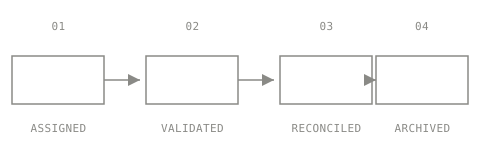
Brian, who led the broader platform effort, described Plug-ins as "multiple applications folded into one" — a fair characterization of the scope, and part of why "lead / sole designer" is a meaningful claim here rather than title inflation.
What replaced the old way of doing this
PIM replaced a set of legacy SharePoint-based tools that the business had outgrown.
Designing inside two-week sprints
Every design decision on this project had to answer a second question beyond "is this right": can an agile team actually build this in a two-week sprint? That constraint shaped scope more than any style guide did — it meant breaking large redesigns into shippable increments, being deliberate about what to defer, and designing extensions to the existing pattern library rather than one-off treatments that would take a sprint to build and another to maintain.
Outcome, honestly stated
- The redesigned UI was validated against the legacy interface through direct A/B comparison, not assumption.
- The product established a consistent visual and interaction foundation used across new epics going forward — reducing the amount of new UI pattern debate needed for each feature.
- PIM fully replaced the SharePoint-based tools it succeeded.
- The platform's success became the basis for a larger, funded rebuild of adjacent inventory applications (Capital Tools, Minor Materials, TEO) reusing the patterns and components built here.
What I won't claim: a specific percentage improvement in efficiency, adoption, or error rate that I didn't actually measure.
Lessons learned
The biggest thing I'd change in hindsight isn't a design decision — it's research discipline. A platform this large would have benefited from smaller, workflow-scoped research questions early (e.g. "how does an audit user investigate a discrepancy, end to end?") rather than one broad discovery phase at the start. The tiered beta model we ran was arguably more valuable than that initial research anyway, because it exposed the product to progressively more realistic users and conditions — but formalizing the link between feedback, design decisions, and post-release outcomes would have made that value easier to prove and easier to repeat next time.